Overview
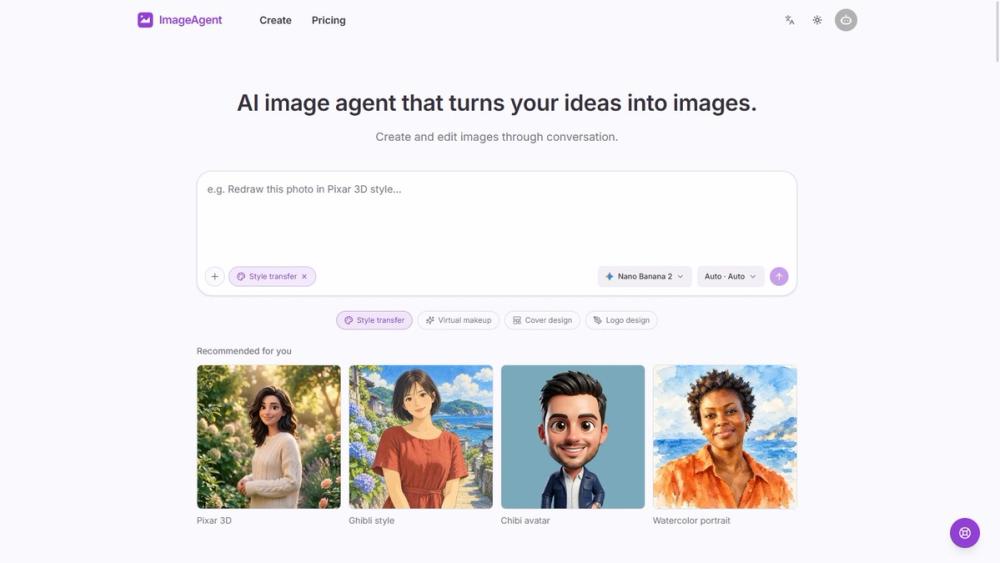
ImageAgent introduces an AI workflow for turning an initial idea into visual content. Review the visual result before deciding which details to change in the next message. ImageAgent is an AI workspace for creating and editing images through conversation. Start with a text description or upload a reference image, then describe changes to the background, composition, colors, or visual style. Refine results in the same conversation without restarting your brief.
Key Features
- The workspace can be used for cover design and logo design concepts. Use cases include product photography, illustrations, infographics and flow diagrams.
- Finished images can be downloaded after the generation and refinement workflow. Start from a text description to generate an image through a conversational interface.
- Upload a reference image and describe the changes you want in ordinary language. Refine the background, composition, colors or visual style within the same conversation.
- Choose among multiple image models according to the direction of the project. A canvas lets users arrange and compare images and earlier iterations.
- Creative history and the image library provide ways to revisit and reuse previous material. Style transfer is one of the supported ways to explore a different look for an image.
Use Cases
- Conversational image editing: describe a visual idea, inspect the output and request a specific change in the same chat.
- Team visual briefs: use an image reference and written instructions to explore a shared idea without restarting the brief at every iteration.
- Cover and logo concepts: explore alternative compositions or styles, then arrange versions on the canvas for comparison.
- Product photography concepts: upload an existing product image and describe changes to its background, composition or colors.
- Campaign artwork: develop visual options from a campaign brief and refine the selected direction through follow-up messages.
- Creator illustrations: build portraits or illustrations from text and reference images while keeping earlier versions available.
Getting Started
- Open https://imageagent.org/ and review the account and generation options.
- Review the visual result before deciding which details to change in the next message.
- The workspace combines conversational image creation with a canvas for reviewing and organizing iterations.
- Review the result and describe the changes to explore next.
- An uploaded reference can carry the starting visual idea while the conversation describes what should change.
- Compare iterations on the canvas, revisit the image library if needed, and download the image you decide to use.
Pricing & Plans
Monthly and yearly subscriptions and one-time credit packs are available. Commercial use on paid plans remains subject to applicable rights and service terms. Review the current pricing page and displayed usage requirements before starting paid work. Check plan availability and usage conditions on the product website rather than inferring them from a directory listing.