Introduction
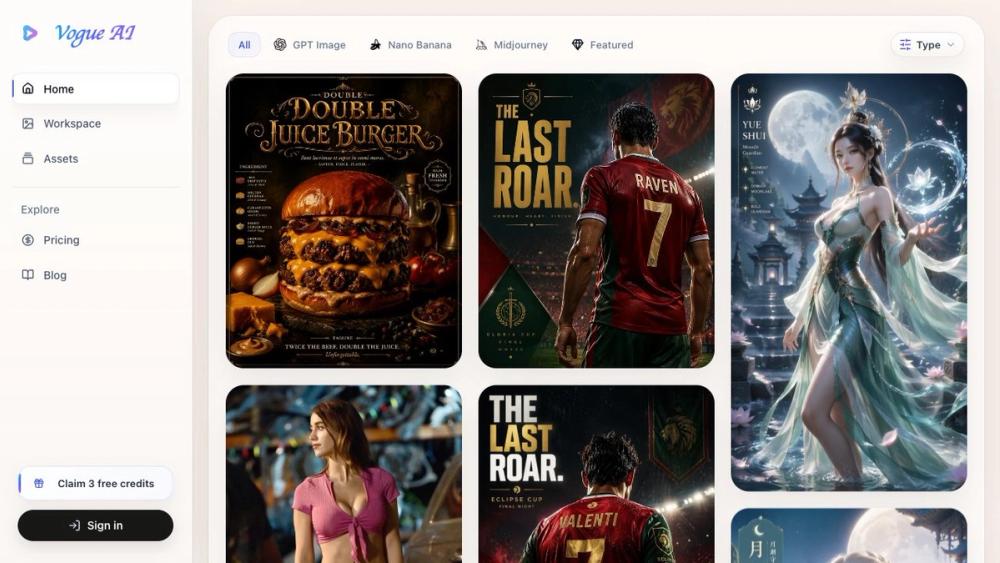
Vogue AI presents itself as a free AI image prompt gallery paired with a generator workspace for creators. The public page emphasizes browsing curated prompts with visual references, copying structures aimed at GPT Image 2, Nano Banana, Midjourney, and related models, then moving into generation without drafting from a blank prompt. Anyone evaluating the product should confirm account, credit, and commercial-use rules in the live workspace before relying on it for client work.
Key Features
- Curated gallery of free AI image prompts with example visuals and prompt cards for product shots, posters, portraits, UI mockups, diagrams, and social-oriented layouts.
- Prompt flows oriented toward GPT Image 2, Nano Banana, Midjourney, and other image models, with some examples model-specific and others described as adaptable.
- Copy-prompt and "Use Prompt" actions that send structure into the Vogue AI composer for subject, style, aspect ratio, and output adjustments.
- "Use as Reference" to keep a gallery image as a visual reference alongside prompt text for image-to-image style workflows.
- Featured prompt categories visible on the homepage, including food still life, brand visuals, character sheets, lifestyle portraits, and poster-style examples.
- On-page FAQ covering browsing, models, credits, reference images, and commercial-use caveats.
Use Cases
Designers and marketers who need starting points for product photography, ad visuals, or portrait concepts can scan the gallery for prompt patterns instead of inventing wording from scratch. The site highlights workflows such as brand visuals, editorial fashion closeups, sports portraits, and diagram-style image-to-image examples.
Creators working across multiple image backends may treat the gallery as a shared prompt library: copy text, open the composer, and tune settings per model. Teams should still verify whether each prompt card matches the model they actually run in production.
Because generation may require an account and credits depending on model and settings, the gallery is likely most useful as a discovery and templating layer, with budget and rights checks done before high-volume output.
Pricing
The site describes the prompt gallery as free to browse and copy. Image generation runs in the Vogue AI workspace and may require an account and credits depending on the model and settings chosen. Navigation mentions Pricing and Blog, but detailed tier tables were not extracted from the single fetched homepage; buyers should open the site's pricing or signup flow for current credit packs and limits.
User Experience and Support
The homepage pairs a featured prompt grid with FAQ answers about models, references, and commercial use, which helps first-time visitors understand the browse-then-generate path. Actions such as "View prompt details," "Use Prompt," and "Use as Ref" suggest a card-based workflow from gallery to composer.
Support signals on the fetched page center on the AI Image Prompts FAQ rather than a dedicated help center link in the extracted copy. Privacy Policy and Terms of Service appear in footer-style navigation lists. Evaluators who need hands-on support should confirm contact or documentation routes on the live site.
Technical Details
Public copy positions Vogue AI around prompt reuse for multiple AI image models rather than a single locked-in engine. Workflow types mentioned include product photos, posters, portraits, UI mockups, diagrams, anime styles, realistic photos, and social posts. Reference-image generation is supported via the "Use as Reference" path described in the FAQ.
The fetched evidence came from the primary homepage only, so API access, batch export formats, or deep integration details are not spelled out in the extracted material. Readers with stack-specific needs should verify those points inside the workspace or any linked tool pages.
Pros and Cons
Pros
- Free browsing and copying of curated prompts lowers the friction of starting new image ideas.
- Visual prompt cards and reference-image options support both text-only and image-guided generation paths.
- Broad prompt categories (product, poster, portrait, UI, social) suit varied creative roles.
- FAQ addresses credits, models, and commercial-use boundaries in plain language.
Cons
- Generation costs and account requirements are model-dependent and need confirmation at signup.
- Commercial rights depend on model, inputs, and reference assets-not a single blanket license on the marketing page.
- Only one site page was captured in preparation, so pricing depth and technical specs may live elsewhere.
- Some prompts may be model-specific; adapting them without testing can waste credits.
FAQ
What is Vogue AI according to its public website?
The site describes Vogue AI as a free AI image prompt gallery and generator workspace where creators browse visual examples, reuse prompt structure, add reference images, and generate from one workspace.
Are the image prompts free to browse and copy?
Yes. The public FAQ states the prompt gallery is free to browse, and visitors can copy prompt text or open a card to reuse its structure for their own ideas.
Which AI image models do the prompts target?
The gallery focuses on reusable examples for GPT Image 2, Nano Banana, Midjourney, and related AI image models. Some prompts are model-specific; many are presented as adaptable across tools.
How do you move from a gallery prompt to a generated image?
Open a gallery card, copy the prompt or send it into the Vogue AI composer, then adjust subject, style, aspect ratio, and output settings before generating.
Can you use a gallery image as a reference when generating?
Yes. The site explains that "Use as Reference" keeps the selected gallery image as a visual reference so generation can use both prompt text and the example image.
Do you need an account or credits to generate images?
Browsing and copying prompts does not require starting from a blank page. Actual image generation uses the Vogue AI workspace and may require an account and credits depending on the model and settings.
What should you verify before using outputs commercially?
The FAQ notes that commercial use depends on the model, your input assets, and rights attached to reference material, and it warns against using copyrighted, trademarked, or private images without permission.
Conclusion
Vogue AI is aimed at creators who want curated AI image prompts and a single workspace to refine and generate. Use the official site to confirm current pricing, credits, and terms, then test the composer with the models and reference workflows you plan to use in production.